Rodrigo Beckmann
CEO
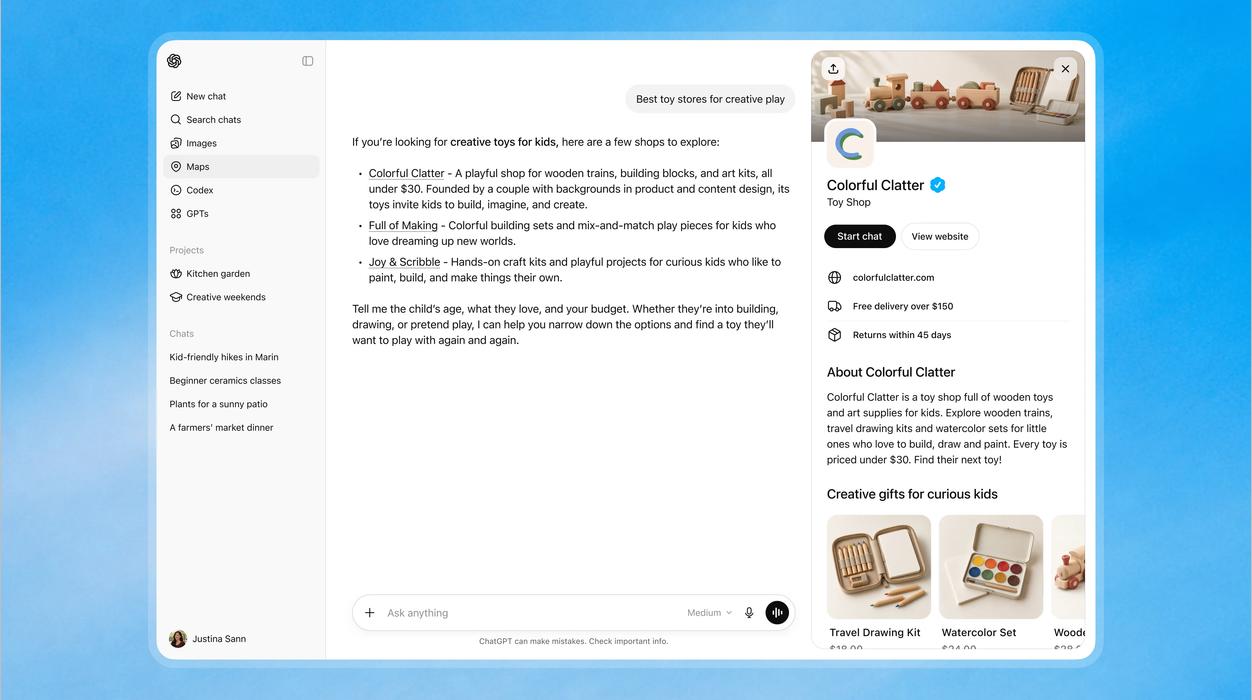
OpenAI launched Businesses in ChatGPT in beta on November 10, 2026. It lets businesses claim their profile in ChatGPT, correct their own information and see how many mentions and clicks they get. Everything is managed in Business Hub, and the official announcement points to the 1.2 billion people who use ChatGPT each week.
It is the first tool from OpenAI itself that shows brands how they appear in answers. For anyone working on AI visibility, it changes measurement, not selection: ChatGPT still decides on its own who it recommends.
Quick summary
- What it is: an OpenAI beta program that gives businesses a manageable profile inside ChatGPT.
- Where: in Business Hub, at chatgpt.com/business-hub or from the ChatGPT sidebar.
- What it unlocks: editing profile details, a product feed with prices and availability, and aggregate data on mentions, clicks and topics.
- Business Agent: an AI agent for the business that answers customers in ChatGPT. For now, only for ecommerce and online service businesses in the US.
- Availability: profile claiming is open to eligible online businesses with a website wherever ChatGPT is available. Local stores and restaurants can only claim listings that already exist in the US.
- Key limit: claiming a profile does not guarantee more prominence in answers.
What Businesses in ChatGPT is
Businesses in ChatGPT is the beta program that gives companies a managed presence inside ChatGPT. It has two parts, Business Hub and Business Agent, and is often confused with a third product that only shares a similar name.
| Name | What it is | Who can use it today |
| Businesses in ChatGPT | Program for business presence in ChatGPT | In beta since November 10, 2026 |
| Business Hub | Management area: claim, verify, edit details, upload a product feed and view insights | Eligible businesses where ChatGPT is available |
| Business Agent | The business's AI agent, in a labeled conversation separate from ChatGPT's own answer | Eligible ecommerce and online service businesses in the US |
| ChatGPT Business | Paid ChatGPT subscription for teams, unrelated to the public profile | Any subscribing company |
Once verified, a business can update its profile details and add product feeds with current prices and availability, according to OpenAI's announcement. Shopify stores connect their store feed; everyone else uploads a CSV file in the format OpenAI specifies.
The Business Agent answers questions, compares products and points to the website, always using information the business provides. The purchase still happens outside ChatGPT, on the brand's own site.
OpenAI says it does not share users' conversations or Business Agent chats with businesses.
How to claim your business in ChatGPT
Claiming has two stages: proving your connection to the business and then passing an identity check. The official walkthrough is in OpenAI's Help Center.
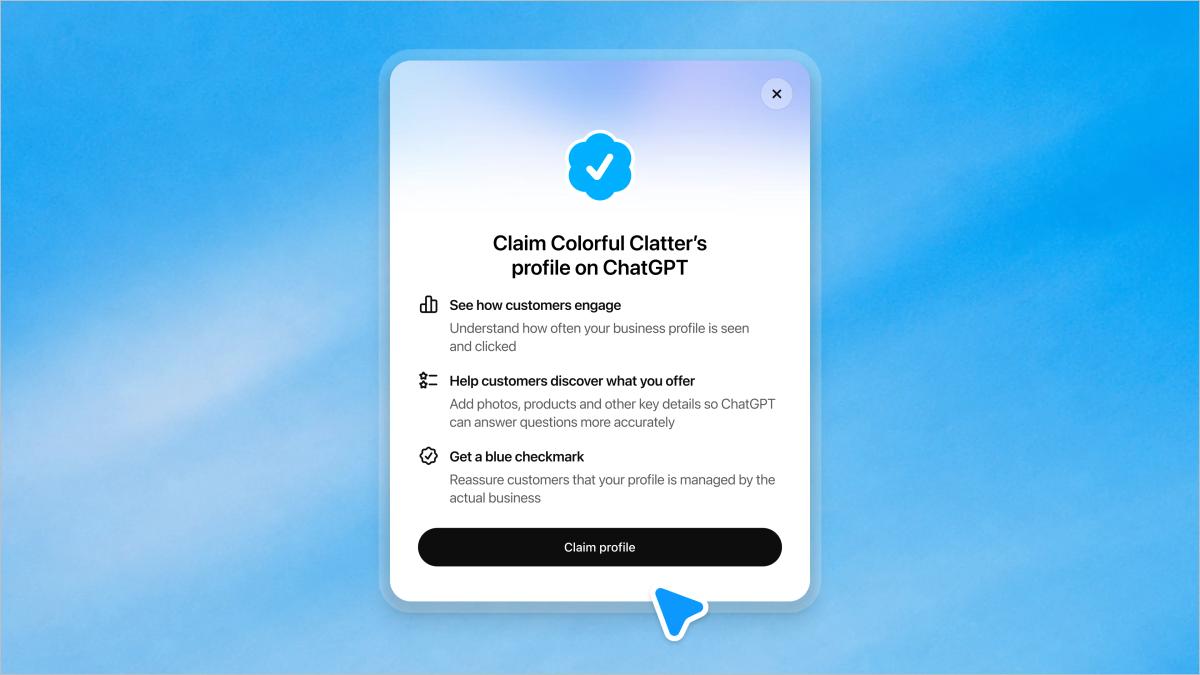
- Sign in to ChatGPT and open Business Hub from the sidebar or at chatgpt.com/business-hub.
- Search for your business by name and select the right listing. If it doesn't appear, eligible online businesses may see an option to add it.
- Confirm the connection with one of the methods offered: a code by SMS or automated call to the business phone, a code sent to the business email, a TXT record in the domain's DNS, or a Shopify login.
- Wait for OpenAI's review. The decision arrives by email.
- Complete identity verification with Persona. It may ask for a government-issued ID, business registration details and proof that you are authorized to represent the business.
Without the Persona step, you can't publish edits, connect a product feed, view insights or create an agent. The blue verified check only appears after that approval.
With a verified profile, the business can edit its website, description, category, logo, cover photo, and delivery and return policies. OpenAI reviews every change, and updates can take time to show up in the profile and in answers.
A few practical cautions. The business name, address and registration number must match official records. A published profile can't be deleted or hidden by OpenAI Support; only drafts can be removed. If someone has already claimed your brand's profile, the profile menu offers an option to dispute ownership. And if you choose DNS, have domain access ready: one user reported on the OpenAI forum a 30-minute window for the record to be recognized.
Who can use Business Hub today?
Any eligible business can claim a profile where ChatGPT is available and the required verification is supported. Business Agents are narrower: for now, they are limited to ecommerce and online service businesses in the United States.
The word that matters is "eligible." According to the product page, claiming starts with businesses that have a website, and eligibility depends on industry, location and OpenAI's verification and integrity checks. Local businesses such as physical stores and restaurants can currently claim only listings that already exist in the US, according to the Help Center. Outside the US, the path for now is online businesses with a website.
OpenAI lists no fee for claiming a profile and requires neither an Ads account nor an Enterprise agreement. The company says it plans to bring the program and agents to more markets and categories, with no dates.
In practice, the way to find out is to open Business Hub and see what shows up for your account.
What Business Hub data shows and what it leaves out
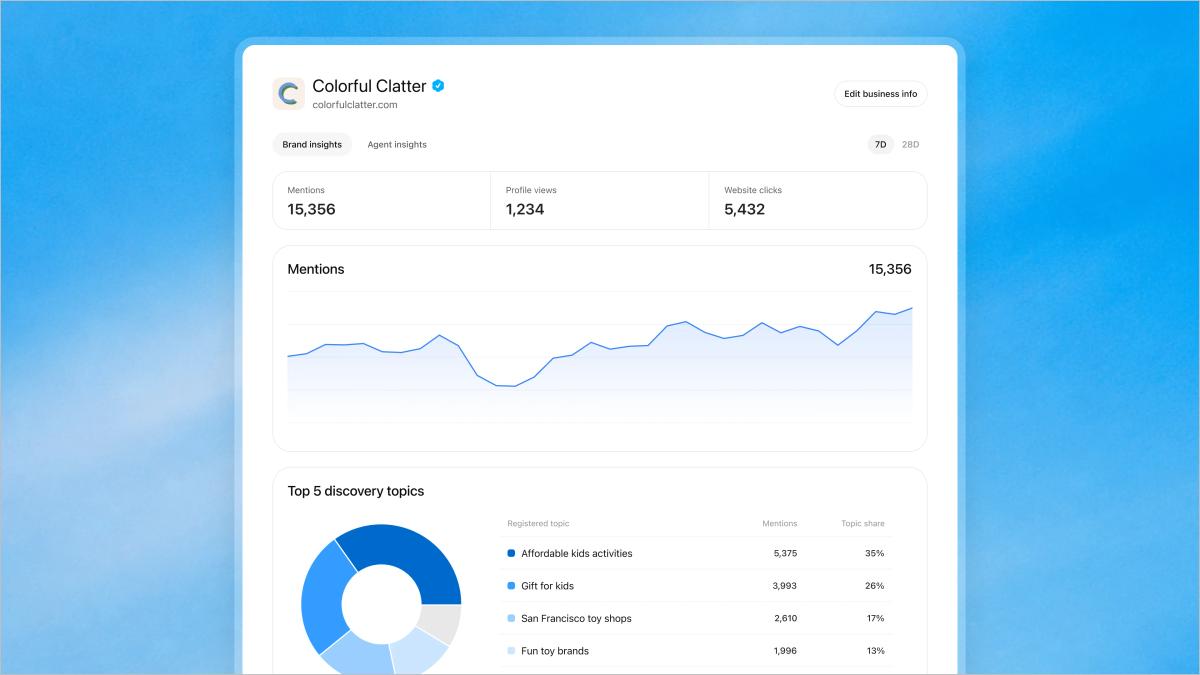
The dashboard reports aggregate numbers for the past 28 days, according to the Help Center: mentions, website clicks and discovery topics. The promotional screenshot also shows profile views and a 7-day selector. This is OpenAI's own data, drawn from real conversations in the product, and that is new. The slice, however, is narrow.
| The dashboard shows | The dashboard doesn't show |
| How many times the business was mentioned | The prompts behind each mention |
| Recorded clicks on links to the website | Whether a click became a visit or a conversion |
| Common themes in answers that mentioned or cited the business | Comparison with competitors |
| Activity in ChatGPT | Gemini, Perplexity, Copilot, Grok and Google AI Mode |
| Volumes above an undisclosed threshold | Activity below that threshold (a blank field is not zero) |
A mention here depends on the website. According to the Help Center, for an online business a mention only counts when ChatGPT references the business's website. The brand name alone doesn't count. For local businesses, what counts is a result shown for that location. The dashboard number is therefore closer to citations than to brand mentions.
A click is not a visit. The dashboard itself warns that a recorded click doesn't confirm a visit or a conversion, as Search Engine Roundtable showed. To close the loop, you need to cross-check with your analytics and with AI visits to your site.
The profile doesn't change the recommendation. OpenAI says claiming doesn't guarantee more visibility or control over recommendations, that advertising doesn't influence answers, and that ChatGPT may use other sources when talking about your business. Being chosen still depends on what the web says about the brand, and that is where the work of being cited by AI comes in.
Why this matters for your brand
The launch confirms, straight from OpenAI, that showing up in AI answers is a channel to be measured and managed. Until now, brands relied on external monitoring and on referral traffic in their analytics.
Business Hub answers "how much" inside ChatGPT. It doesn't say which questions your brand appears in or who appears in its place. Those answers come from prompt monitoring and from tracking how competitors show up in the same answers.
The rest of the market is also left out. The buying journey runs through Google AI Mode, Copilot, Gemini and Perplexity, and each model leans on different sources.
The two views add up. OpenAI's data shows real volume in ChatGPT, measured in the interface people actually use, and interface and API tend to diverge. Monitoring across models shows where to act.
What to do now
- Open Business Hub and check whether your business appears and which verification methods are offered.
- Decide who owns it. Whoever claims the business becomes the admin and can give teammates and an agency access, each person with their own ChatGPT account. Groups with several brands claim them one by one: there is no central management yet.
- Gather your documents and registration details before Persona, identical to official records.
- Align your site and your profile. Description, category and policies should say the same thing in both places, because consistent information helps AI treat your brand as a single entity.
- Check robots.txt. OAI-SearchBot must be allowed for your site to appear in ChatGPT search answers.
- Record the first 28 days as a baseline and, in parallel, track what AIs are saying about your brand in the other models.
If you are still building the routine, our guide to SEO, GEO and AEO shows where to start. And First Answer's free analysis shows how your brand appears in AI answers today.
Sources
- OpenAI: Introducing Businesses in ChatGPT, announcement, November 10, 2026
- OpenAI: Businesses in ChatGPT, product page
- OpenAI Help Center: Setting up your business on ChatGPT
- OpenAI Developer Community: Introducing Businesses in ChatGPT in beta
- Search Engine Roundtable: Businesses in ChatGPT Business Hub Live With Click Data
- Search Engine Land: ChatGPT Business Hub is now live
Frequently asked questions
It is an OpenAI beta program, launched on November 10, 2026, that lets businesses claim and manage their profile in ChatGPT. It is managed in Business Hub, where a verified business edits its details, uploads a product feed and sees mentions and clicks.
Open Business Hub at chatgpt.com/business-hub, search for your business and prove the connection by phone, business email, DNS or Shopify. Then complete identity verification with Persona to unlock profile editing and insights.
Profile claiming is open to eligible businesses with a website wherever ChatGPT is available. Local stores and restaurants can only claim listings that already exist in the US. Business Agents are limited, for now, to ecommerce and online service businesses in the United States.
No. OpenAI says ChatGPT keeps making independent recommendations and that claiming a profile doesn't guarantee a better position or more sales. The profile corrects information; who gets cited still depends on the sources the AI consults.
Yes. For online businesses, a mention only counts when ChatGPT references the business's website; the brand name alone doesn't count. For local businesses, what counts is a result shown for that location.
OpenAI lists no fee for claiming or verifying a profile. You also don't need an Ads account or an Enterprise agreement.
Businesses in ChatGPT handles a company's public profile inside ChatGPT. ChatGPT Business is the paid subscription for teams to use ChatGPT at work. One doesn't include the other.
No. The dashboard reports aggregate data for ChatGPT only and shows no prompts, competitors or other models. It complements AI mention tracking, which follows your brand across several AIs and in specific questions.